
User Tools
Sidebar
pay_calculator
This is an old revision of the document!
Holiday Pay Calculator
CareFree can provide guidance on holiday pay where workers may be on a zero hour contract. It does this by looking back x amount of weeks (government guidelines state 13 weeks) to figure out the suitable pay for a carer. That pay can then be added as an addition and adjustment which will go on the wage sheet for that carer.
Please be aware that the holiday pay calculator works from finalised wages, if you do not run your wages through CareFree then this tool will not provide any meaningful information. If you feel that you might want to start using CareFree for the financial aspects of the system but currently don't, then don't hesitate to contact your account manager to provide further information regarding training.
Lets first get access to the pay calculator, from the tools drop down menu select “Holiday Calculator”:

This will open the main pay calculator screen:
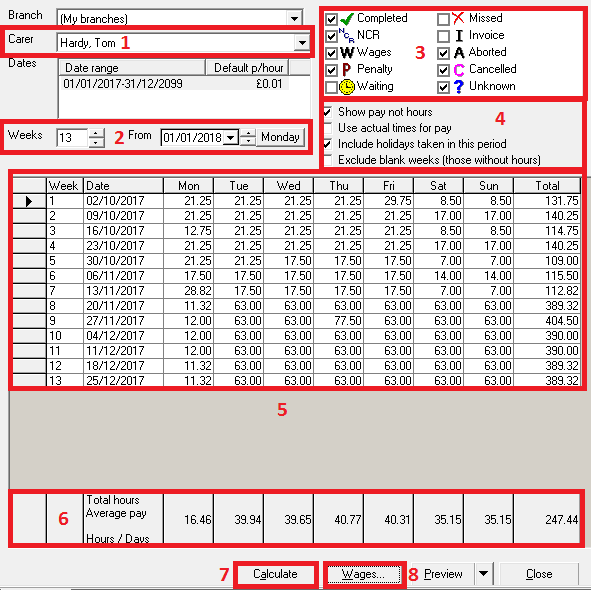
1) Select the carer from the drop down list for who you want to work out holiday pay.
2) This section allows you to tweak when it will work out the thirteen week period from, you can also change the amount of weeks to take into consideration, but as already stated the government guideline is thirteen weeks.
3) Using the tick boxes, select the calls you typically pay your carers for. Us the tip below for help with this.
Ask the question - Do I pay my carers for “COMPLETED” calls?, if the answer is yes, then tick the box. Repeat this for all other boxes. Do I pay my carers for “NCR” calls, this might be answered with a no, so have the box un-ticked.
4) Select the correct criteria for your company here to alter how the table is presented below.
7,5) Click the “Calculate button to display information in the table (5)
6) This panel holds the average values for each column. This figure is presented by the calculation “total hours added up in the column divided by the days”
pay_calculator.1514907135.txt.gz · Last modified: 2018/01/02 16:32 by cfadmin


